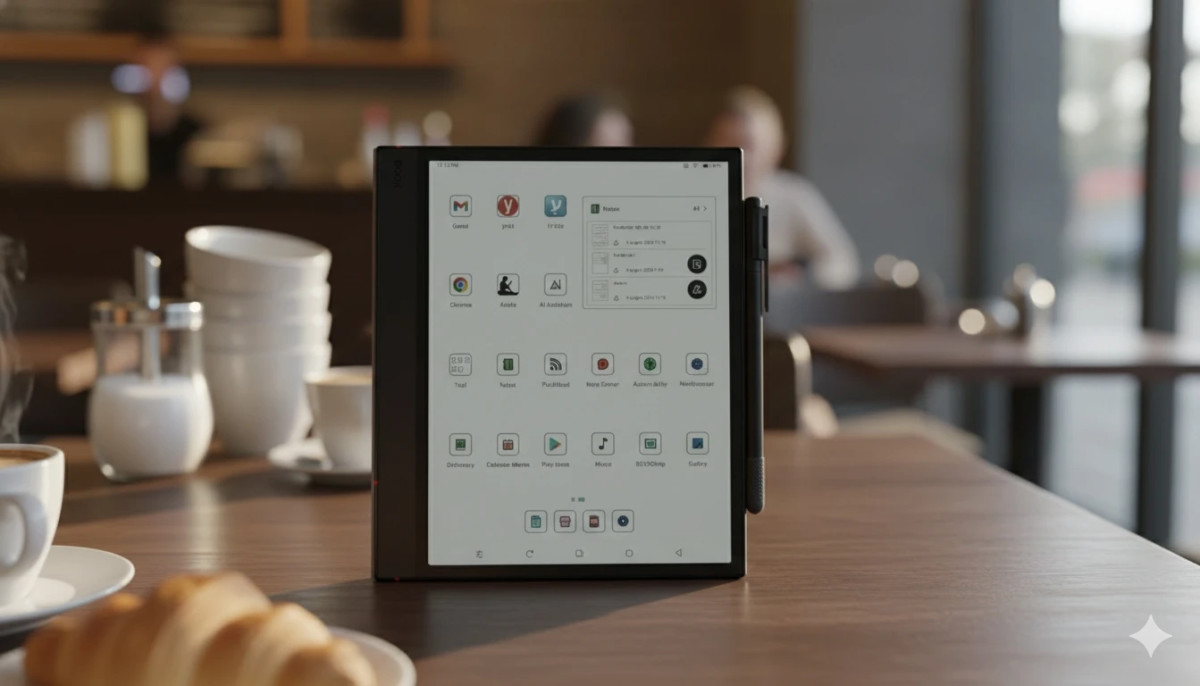
As with Newton’s law of action and reaction (don’t run away, it will be interesting), in the age of endless distractions brought us by the introduction, there seems to be a growing demand for technology that does just the opposite. This is where the electronic ink technology comes into play, allowing a dynamic screen display, while maintaining a paper-like appearance, which is easy on the eyes. After the success of the previous model, the Note Air 4c, Onyx Boox recently launched the new generation of the multipurpose tablet, the Note Air 5c. This is an Android-based e-ink tablet that comes with a new pen, and is designed to be a multi-use productivity device.
Construction and design quality – upgrade or lower?
At first glance it is difficult to see a significant difference between the models. The screen is the same size, 10.3 inches, surrounded by a sizable frame, which thickens on the left side of the device for a comfortable grip. The tablet is extremely thin and weighs only 440 grams, but does not feel fragile or weak. Unlike the previous model, the 5C is equipped with volume buttons, which can be configured for various actions such as moving pages, scrolling, and of course volume control, although audio does not play a significant role in the device. Similar to the previous generation, here too you can find a fingerprint sensor, on top of the power button, but it is important to note that its performance is very disappointing. Most times, after too many attempts, I just gave up and typed in the password.
Along with the device comes a new type of pen, which is magnetized next to the device. I will expand on the pen later, but it is important to note that the magnet that holds the pen in the best way actually positions the pen in a way that presses the lower volume button. There is another magnetic point that solves the problem, but it is significantly weaker, and it seems that this is not what the poet intended. In many cases this is not a problem, but when reading, for example, the pages run automatically following the pressure of the pen on the button.
With the device you can purchase an original magnetic cover, which has also changed from the cover of the previous generation. The cover is made of hard leather-like material, mottled brown in color, with a soft, velvety material on the inside and there is also a hole around the charging socket. The cover folds into an origami that allows the tablet to be placed in several ways, more conveniently than the cover in the previous generation. However, a slightly odd choice was made here to detach the part that closes the cover and holds the pen, so that it can be removed or attached. This choice solves the problem in the previous generation, where the bracket disrupted the field of the part of the screen directly above it, but creates a new problem. The part in question is simply left aside every time the tablet is used, without any convenient way to store it. It is not possible to place the piece of skin under the cover, because then the magnet problem returns, which creates a dead area on the screen. This is not a too serious problem, when the bracket can be placed aside while in use, but this problem, together with the pen pressing on the volume button, shows a rather superficial thinking in the external improvements of the tablet. If they are already improving the previous generation, I would expect in-depth thinking, and not a “band-aid” solution that produces other problems.
The Note Air 5c, like the previous generations, uses “Claydo 3” technology, which enables a color display through a special filter on the screen. The filter enables the color display, but as in previous generations produces a slightly darker screen than that of similar devices with a black-and-white display. This matter can be solved by using built-in lighting, with 32 brightness levels, and 32 “temperature” levels, ranging from a cold-blue display, to an orange screen almost like certain American presidents.
Unlike the previous generation, with the Note Air 5c I had trouble finding the perfect display, no matter how much I played with the brightness and color settings. The screen always looks too dark or too bright, too blue or too orange, when in the previous generation I reached a level of display that felt like paper. It may be a matter that will be fixed with a version update in the future, but Onyx chose to give up the winning horse, apparently in favor of increasing the resolution.
For those who are not familiar with electronic ink devices, it is important to note that these are not bright colors like most of the screens we are familiar with from regular screens such as telephones or computers, but rather a subtle, even implied color that sometimes looks like printed newspaper. Refreshing the screen is also completely different, since it is a completely different technology, so the use of these devices is not intended for watching videos, or even scrolling through social networks, but more for static and productive uses, such as reading, writing, managing a diary and lists, signing documents, and more.
The Note Air 5c is equipped with a new type of pen, the Pen 3. Right out of the box, the pen feels better quality, with a little more weight, and a metal body, compared to the plastic of the previous pen. Although the pen is not yet equipped with an eraser, or a button for erasing, it has a new trick – the pen head opens, and in it are stored 3 additional points for the pen. This is not a bad idea at all, which solves the need to carry additional prongs, or alternatively, the fear of erosion of the existing prong. However, I would prefer a pressure pen, or a more convenient cap, which is less easy to lose, over a solution to a more marginal problem like the nibs. The detachable head, by the way, can be locked by half a turn, so my initial fear of a certain loss of the prongs managed to dissipate a little.
The feeling of writing with the pen was a little too rough, making squeaks the first few times, but very quickly, with continued use, the situation improved, and writing became particularly pleasant. It is important to note that even in the previous generation, the note air 4c, the feeling of roughness resembled writing on paper, and after using it for a few days, it is already difficult to notice the difference, but writing in the new generation feels a little more natural. The responsiveness of the device to the pen is 20 percent faster compared to the previous generation, and there is almost no delay between the pen and the screen. The sensitivity to the pressure applied to the pen has also been improved, which allows for more intuitive writing, and more options, especially for drawing or writing with different brushes.
In the built-in notes application, you can find, similar to the previous generations, a very large variety of options. From converting handwriting to text, which, by the way, works great in Hebrew as well, through adding media and recordings on top of the notes, to recognizing shapes, and erasing through chatter on the text, which works much better than in previous generations.
In the new generation, a new option of “infinite notes” was created. This is a format that can be enlarged and expanded as you choose, regardless of the length or width of given pages.
The device easily connects to Bluetooth devices such as a keyboard, but is also equipped with a magnetic connection for the dedicated keyboard cover that the company allows to be purchased separately, at a not low price at all (NIS 500). The same keyboard cover can be purchased in English only, but you can easily set the languages of the device, and use keyboard stickers in Hebrew, or any other language. If you really want, you can also connect the device to other Bluetooth devices such as a mouse or speakers, although I did not see a single advantage in this. Although the device supports Bluetooth 5.1, which is relatively outdated, every operation I tried to do worked not bad at all, possibly due to the simplicity of the information transmitted through it, which mainly includes text typing.
The possibility of the tablet as an Android device for everything, allows you to use it for a very large variety of tasks. I actually type these lines using the device, with a simple external bluetooth keyboard, which does a not bad job at all. In addition, it is very easy to “project” the tablet screen onto different screens (computer, phone or TV), but I was not able to use the tablet itself as a monitor for the computer or any other device.
In terms of the battery, the device performs better than the previous generation, and allows for continuous work of several days, but this varies greatly depending on the use of the backlight, and the refresh modes of the screen. The relative darkness of the screen (due to the color filter of the Kleido 3 screen), forces a high use of the backlight, so that in relation to electronic ink devices without backlight, this is a particularly significant difference. When used without backlight, in the default settings, the Note Air 5c can reach several days of continuous use. Any change in the refresh rate settings and the addition of the backlight reduce the battery life significantly, which can reach only a few hours of use.
After experimenting with quite a few electronic ink devices, including the two previous models in the series, I had high expectations. Especially since I saw that so far there was no significant change in the new model that warranted an upgrade, I was very happy to discover that there is indeed a very significant improvement in the performance sector. The Note air 5c is equipped with a Qualcomm Snapdragon 750G processor, with 8 cores, a working memory (RAM) of 6 gigabytes, and runs on Android 15.
The performance on the note air 5c is one of the highest I’ve seen among electronic ink devices. Usually on these devices, any movement on the screen such as scrolling, zooming or dragging, leaves behind ghostly remnants of the previous screen display, in a byproduct called “ghosting”. Compared to previous generations and competing models that I had the chance to try, there is a very significant improvement in performance, when similar residues are hardly visible, even when moving an image on the screen. Even in the more economical battery modes, with low screen refresh, the operating speed in the new generation is especially improved, and enables an experience closer to the experience of using tablets with a “normal” screen. It is important to note that despite the significant progress, electronic ink technology is very far from enabling display performance such as watching videos or scrolling smoothly through social networks.
The Boox Note Air 5c is an excellent inkjet device, which allows for a wide range of operations, while maintaining a display that does not tire the eyes. With extremely high performance, new accessories and an improved Android version, Onyx creates quite a competition for the companies competing in the electronic ink device market. Despite the small head in the design of the complementary accessories, the design of the screen lighting and the battery life, this is one of the most impressive devices in the category.
https://gubernskiy-smolensk.ru/files/pgs/bezdep-za-registracziyu-v-kazino-onlajn-2025-s-vygodnymi-usloviyami.html
http://playashshi.ru/w2/articles.php?besplatnye-spiny-za-registracziyu-bez-depozita-i-uslovij-otygrysha.html
https://rozetkaonline.ru/components/pgs/bezdepozitnye-bonusy-2025-bez-vlozhenij-s-vozmozhnostyu-vyvoda.html
https://krassota.com/wp-content/pgs/onlajn-kazino-s-luchshimi-bezdepozitnymi-bonusami-i-spinami.html
https://1stones.ru/wp-content/pgs/bezdep-za-registracziyu-v-kazino-2025-bez-riskov-i-vlozhenij.html
https://wiki-factory.ru/wp-content/pgs/besplatnye-spiny-za-registracziyu-bez-depozita-s-realnym-vyvodom.html
https://anikron.ru/images/pgs/?bezdepozitnye-bonusy-2025-dlya-novykh-igrokov-v-kazino-onlajn.html
https://stroy-dokument.kz/media/pgs/?onlajn-kazino-s-luchshimi-bezdepozitnymi-bonusami-2025-goda.html
http://ipuzzles.ru/wp-content/articles/?besplatnye-spiny-za-registracziyu-bez-depozita-s-vyvodom-deneg.html
https://hm-net.ru/inc/pgs/index.php?bezdep-za-registracziyu-v-kazino-s-bystrym-vyvodom-vyigryshej.html
https://kadastrof.ru/assets/pages/gde-najti-onlajn-kazino-s-luchshimi-bezdepozitnymi-bonusami-2025.html
https://pechi-sauna.ru/wp-content/pgs/bezdepozitnye-bonusy-2025-i-besplatnye-spiny-za-registracziyu.html
https://www.evacuator-moskva.ru/images/pgs/luchshie-besplatnye-spiny-za-registracziyu-bez-depozita-s-vyvodom.html
http://bryansk-vorota.ru/smarty/pgs/bezdep-za-registracziyu-v-kazino-bez-vlozhenij-i-riskov.html
https://logospress.ru/content/pgs/?kak-poluchit-bezdepozitnye-bonusy-2025-v-kazino.html
https://glavgeocom.ru/html/pgs/index.php?onlajn-kazino-s-luchshimi-bezdepozitnymi-bonusami-2025_2.html
https://gold-benilux.ru/im/pgs/besplatnye-spiny-za-registracziyu-bez-depozita-s-vyvodom_2.html
https://koz-salon.ru/wp-content/pgs/bezdep-za-registracziyu-v-kazino-s-momentalnym-dostupom.html
https://hoz74.ru/wp-content/pgs/bezdepozitnye-bonusy-2025-dlya-novykh-igrokov-v-kazino.html
https://rockstar-games.ru/arts/gde-najti-onlajn-kazino-s-bezdepozitnymi-bonusami-i-vyvodom.html
https://vedabazar.ru/art/luchshie-bezdepozitnye-bonusy-2025-dlya-igrokov-onlajn-kazino.html
http://neriskayaks.com/img/pgs/besplatnye-spiny-za-registracziyu-bez-depozita-i-vyvod-vyigrysha.html
https://fb2knigi.ru/wp-content/pages/top-onlajn-kazino-s-bezdepozitnymi-bonusami-i-frispinami.html
https://monarch-kovrov.ru/wp-content/articles/kak-poluchit-bezdep-za-registracziyu-v-kazino-v-2025.html
https://svoyage.ru/doc/pages/bezdepozitnye-bonusy-2025-i-besplatnye-vrashheniya.html