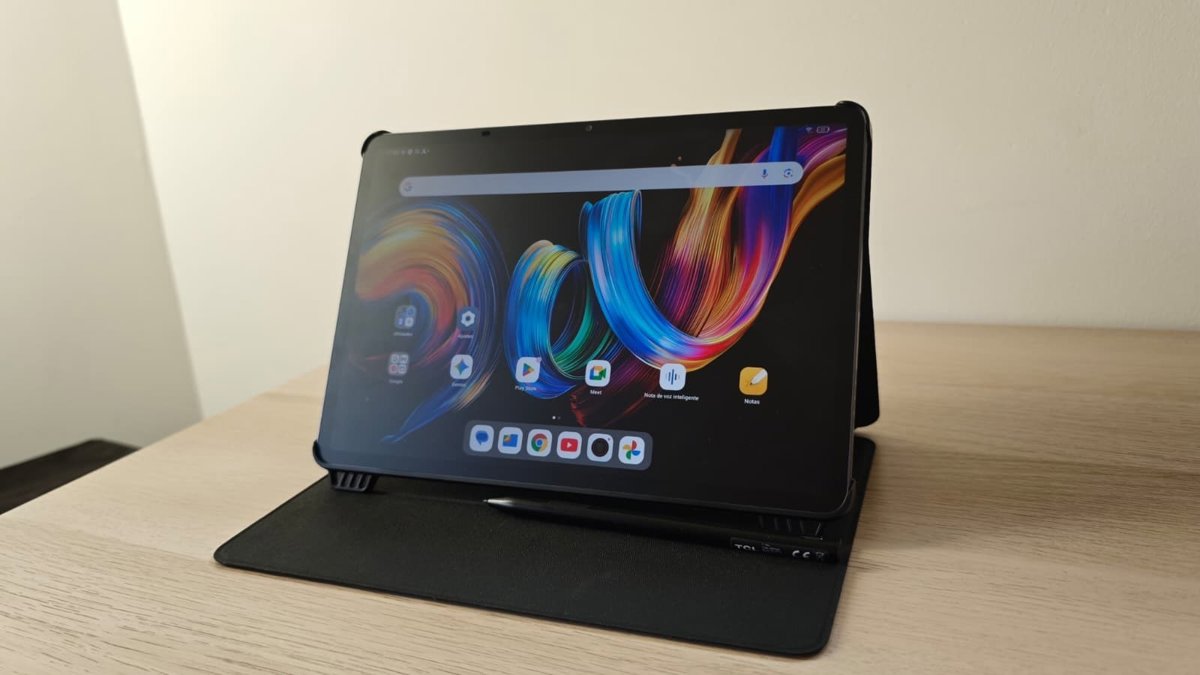
Despite his matte finishthe screen of the TCL NXTPAPER 11 Plus tablet defends itself better than could be expected in circumstances of direct exposure to sunlight.
NXTPAPER 4.0 technology, with fluid performance optimized for the human eye, offers two viewing modes: smart eye comfort mode y custom eye comfort mode.
Additionally, it offers a 3-in-1 VersaView user interface, with the normal modeblack and white (ink paper) y colored paper. Swapping these modes is very simple thanks to the button located at the top, which also serves to activate the artificial intelligence functions.
The mode that we have used the most has been normalto keep the tones vivid at all times, but we have also tested the color modewhich brings the tablet closer to a Kindle, desaturating all elements of the screen and reducing the impact of blue light. It is more suitable for longer sessions.
On the other hand, the ink paper (black and white) removes any color from the screen, ideal for readings. However, it is a fairly limited mode, since having all aspects of the tablet in black and white is an inconvenience when you want to perform other types of tasks on the device.
DESIGN, CAMERA AND AUDIO
Another highlight of the TCL NXTPAPER 11 Plus tablet is its lightweight design of 490 gramswhich allows it to be transported as another work device in backpacks, briefcases or bags. In addition, its folding case is quite versatile, as it protects the screen and works as a stand to place the device on surfaces.
Regarding the camera, the TCL NXTPAPER 11 Plus has a 8MP front camera and 8MP rear camerafor video calls and conferences, which has the technology of CerterFace stabilizationand it also allows you to scan documents or take quick photos, nothing more. We can say that the camera is functional, but it is not close to the quality of smartphone cameras.
Regarding audio, the tablet incorporates four speakers and two microphones. One aspect in which the TCL NXTPAPER 11 Plus tablet could improve is the inclusion of a jack port, since it only has a type C port, thus limiting connecting it with headphones that do not have this type of input, for example.
AI FUNCTIONS FOR TRANSCRIPTION AND TRANSLATION
The TCL NXTPAPER 11 Plus is the brand’s first powered by artificial intelligence (AI), with features such as Text Assistant or Writing Assistantto improve text management by offering intelligent suggestions for rewriting, translating and summarizing.
There are two ways to access them, dragging the screen to the right twice, or with a drop-down button. In my case, I have opted for the second, faster and more intuitive. Although the first option is the default, it is appreciated that there is a simpler alternative.
Returning to the functions of Text and Writing Assistantthe AI built into the TCL NXTPAPER 11 Plus tablet fulfills correctly with the requested instructions, such as asking them to write an email to your boss to request a vacation. Furthermore, it presents various modes of response: shorter, longer, professional or casual. However, it is a function that any artificial intelligence (AI) assistant fulfills, such as Gemini, which is already built into the device as standard.
Furthermore, the feature Smart Voice Memo You can record and transcribe conversations, creating outlines or mental maps to share with the rest of the attendees, while Smart Translator provides simultaneous translation of voice, text and image, with the aim of guaranteeing fluid communication between languages.
To test the transcription function, a video of “The Evening of the Year” by content creator Ibai Llanos was taken as a reference. In this way, we tried dividing the screen with the YouTube video on the left and the transcriber on the right, with the source language and translation in Spanish. 30 seconds of video were enough to verify how the tablet collected the statements of the interlocutors, yes, with a precision that leaves something to be desired. Although technically it works, we have been able to see incorrectly collected words, incorrect expressions and a clear differentiation of each interlocutor has also been missing.
On the other hand, the Smart Translator function offered better results. With several interfaces depending on how the interlocutors are positioned, the split screen of this live translator is very practical as it resembles a conversation through written messages. However, it has also shown slight errors in transcription.
However, it is worth remembering that it is the first TCL tablet to integrate artificial intelligence, so it is logical to find errors of this type that will probably be solved with updates or in upcoming models.
Specifically, the interface that shows each side of the screen facing each user has drawn attention, in the style of the classic “sink the fleet” game. Although on the surface this conversation interface seems simple, users can also listen to each message. Sometimes less is more. Simple, useful and effective.
BATTERY AND AUTONOMY
The TCL NXTPAPER 11 Plus tablet features a 8,000 mAh battery. During the tests carried out, we have been able to use it for periods of one hour a day without any type of battery optimization program, although affecting the AI characteristics. With this type of use, the battery has run out after about three days.
As for charging, the tablet has recovered a percentage of 20 percent in 30 minutes and 50% in one hour despite its 33 W fast charge. This has probably been the aspect that has left the most to be desired in the tablet, since in the product specifications on the TCL website it states that the full charge is done in about 1.8 hours, but in practice it has taken about three hours.
Once the aspects of the TCL NXTPAPER 11 Plus tablet have been analyzed, it can be said that it is a device that performs day-to-day functions, which stands out for a screen that adapts to different user needs and the use they make of it with its various easily interchangeable modes.
https://Norfolkjunkremoval.us/specialty-services
https://Quincyjunkremoval.top/commercial-junk-removal/construction-companies
https://Quincyjunkremoval.top/commercial-junk-removal/hospitality
https://Quincyjunkremoval.top/commercial-junk-removal/office-buildings
https://Quincyjunkremoval.top/commercial-junk-removal/property-management
https://Quincyjunkremoval.top/commercial-junk-removal/restaurants
https://Quincyjunkremoval.top/commercial-junk-removal/retail-stores
https://Quincyjunkremoval.top/commercial-junk-removal/storage-unit-cleanout
https://Quincyjunkremoval.top/commercial-junk-removal
https://Quincyjunkremoval.top/residential/appliance-removal
https://Quincyjunkremoval.top/residential/basement-attic-cleaning
https://Quincyjunkremoval.top/residential/bulk-trash-pickup
https://Quincyjunkremoval.top/residential/furniture-removal
https://Quincyjunkremoval.top/residential/garage-clean-out
https://Quincyjunkremoval.top/residential/hot-tub-removal
https://Quincyjunkremoval.top/residential/mattress-disposal
https://Quincyjunkremoval.top/residential/piano-removal
https://Quincyjunkremoval.top/residential/regular-trash-pickup
https://Quincyjunkremoval.top/residential/scrap-metal-removal
https://Quincyjunkremoval.top/residential/shed-removal
https://Quincyjunkremoval.top/residential/tire-disposal
https://Quincyjunkremoval.top/residential/yard-waste-removal
https://Quincyjunkremoval.top/residential
https://Quincyjunkremoval.top/specialty-services/construction-debris-removal
https://Quincyjunkremoval.top/specialty-services/dumpster-rental