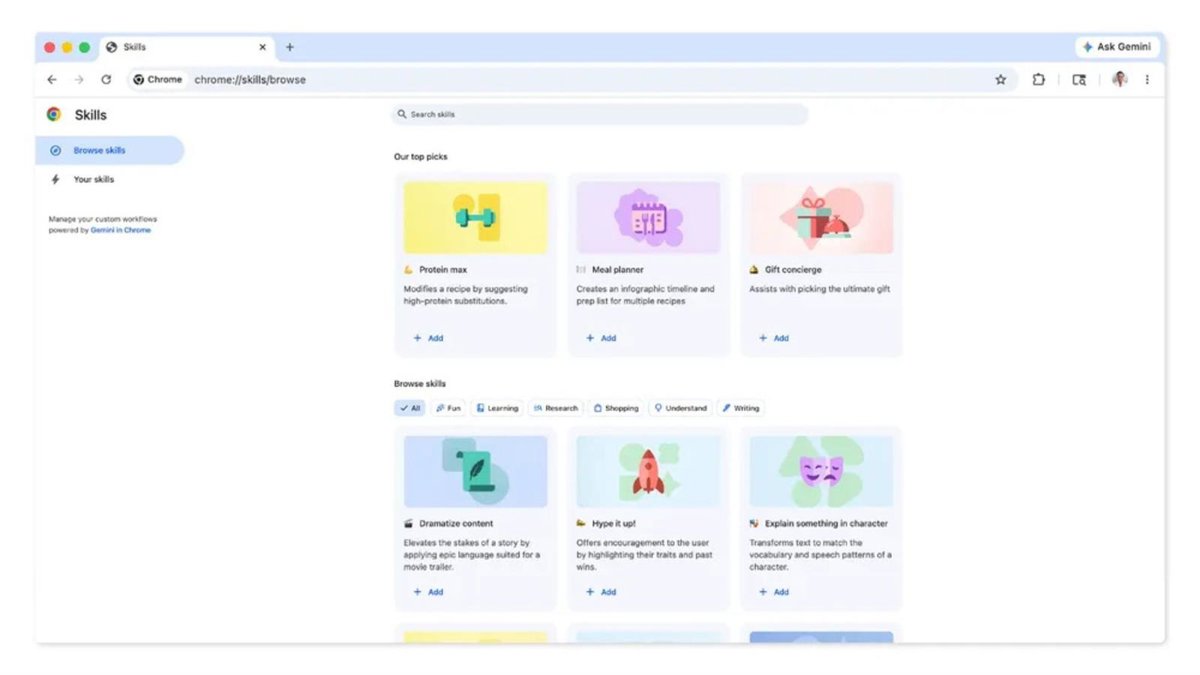
Google has launched the ‘skills’ en Chrome so that users can save directions to the Gemini artificial intelligence (AI) assistant in the browser and be able reuse them at any time.
This new feature allows streamline user workflowwhich They will not have to continually repeat the same commands to Gemini when browsing in Chrome.
For these prompts to be recorded in Chrome, users must open the Gemini chat in a browser sidebar and enter an order. After answering, a button will appear with the option to “save the prompt as a skill”and save. If you click on save, a small window will open within the browser to add a name to the ‘skill’, and edit the statement. Once the window has been filled, the message “‘skill’ saved” will appear.
Along with these ‘skills’ in Chrome, Google has launched a library to store them and also to search for others that may be useful to users. In addition, external skills can be edited so that they can be more tailored to the needs of each person.
To better understand how this function works, Google has explained on its blog several cases in which ‘skills’ can be useful. For example, in the area of the health and well-beingusers can quickly calculate the protein in a recipe without having to tell Gemini repeatedly thanks to a ‘Protein Calculation’ skill.
You can also improve productivitysince the option to analyze long documents can also be configured to filter the most important information.
Regarding data privacy, Google has clarified that these ‘skills’ have the same protection measures as Gemini notifications in Chrome. However, confirmation will be requested before performing certain actions, such as adding an event to the calendar or sending an email.
The company has indicated that this ‘skills’ function is now available on Mac, Windows and ChromeOS for those users who have the Chrome language set to American English.
https://www.friend007.com/forums/thread/42623/
https://pub9.bravenet.com/forum/static/show.php?usernum=693793040&frmid=1940&msgid=857140&cmd=show
https://www.adrex.com/en/forum/via-ferrata/what-s-the-easiest-way-to-scan-and-manage-documents-on-the-go-83208/
https://www.friend007.com/forums/thread/42620/
https://www.weldingandstuff.net/group/mysite-group/discussion/376e1605-6e0d-4f45-9101-c81377a53372?commentId=8f55a92e-3a96-4b09-beec-2a34a7e77402
https://dev.to/bob_morins_/scan-documents-anytime-with-ease-1j12
https://www.adrex.com/en/forum/via-ferrata/how-can-i-easily-organize-and-digitize-all-my-documents-on-my-phone-83207/#forum-add-msg
https://network.musicdiffusion.com/forums/thread/13090/
https://fpgeeks.com/forum/showthread.php/53026-How-Can-I-Instantly-Turn-My-Phone-into-a-Scanner?
https://rentry.co/wdq7zhyt
https://wakeuptaylor.boardhost.com/viewtopic.php?pid=49158#p49158
https://members3.boardhost.com/gatchat/msg/1774362754.html
https://rentry.co/ripywgxb
https://steemit.com/minute/@melanieperez17/5-minute-learning-machine-pdf?sort=new#comments
https://www.fitday.com/fitness/forums/off-topic/44355-pdf-tools.html
https://www.sunemall.com/board/board_topic/8431232/8034398.htm
https://www.myaspenridge.com/board/board_topic/3180173/8034394.htm
https://pub9.bravenet.com/forum/static/show.php?usernum=693793040&frmid=1940&msgid=857639&cmd=show
https://writexo.com/share/fea01e080107
https://moneyfx.boardhost.com/viewtopic.php?pid=72792#p72792
https://www.tumblr.com/welmakiss0/803195000430247936/when-working-on-small-business-projects-being
https://www.fitday.com/fitness/forums/success-stories/50113-safe-store-important-documents-my-phone.html#post196609
https://www.adrex.com/en/forum/via-ferrata/what-s-the-best-way-to-digitize-old-paper-documents-83206/#forum-add-msg
https://fpgeeks.com/forum/showthread.php/53221-Can-I-Use-My-Phone-to-Scan-Documents-for-Work-or-School?p=465054#post465054
https://logikmemorial.ca/forum/index.php?topic=663648.0